A missing HSN code does not stop an invoice from being generated. That is the whole problem. The line falls back to your shop's default GST rate, the invoice looks perfectly normal, and you find out at filing time that a month of documents charged 18% on something that should have been 5%.
This guide covers how many digits you actually need, what BillNest does when a code is missing, and how to repair invoices that are already issued.
How many digits you need
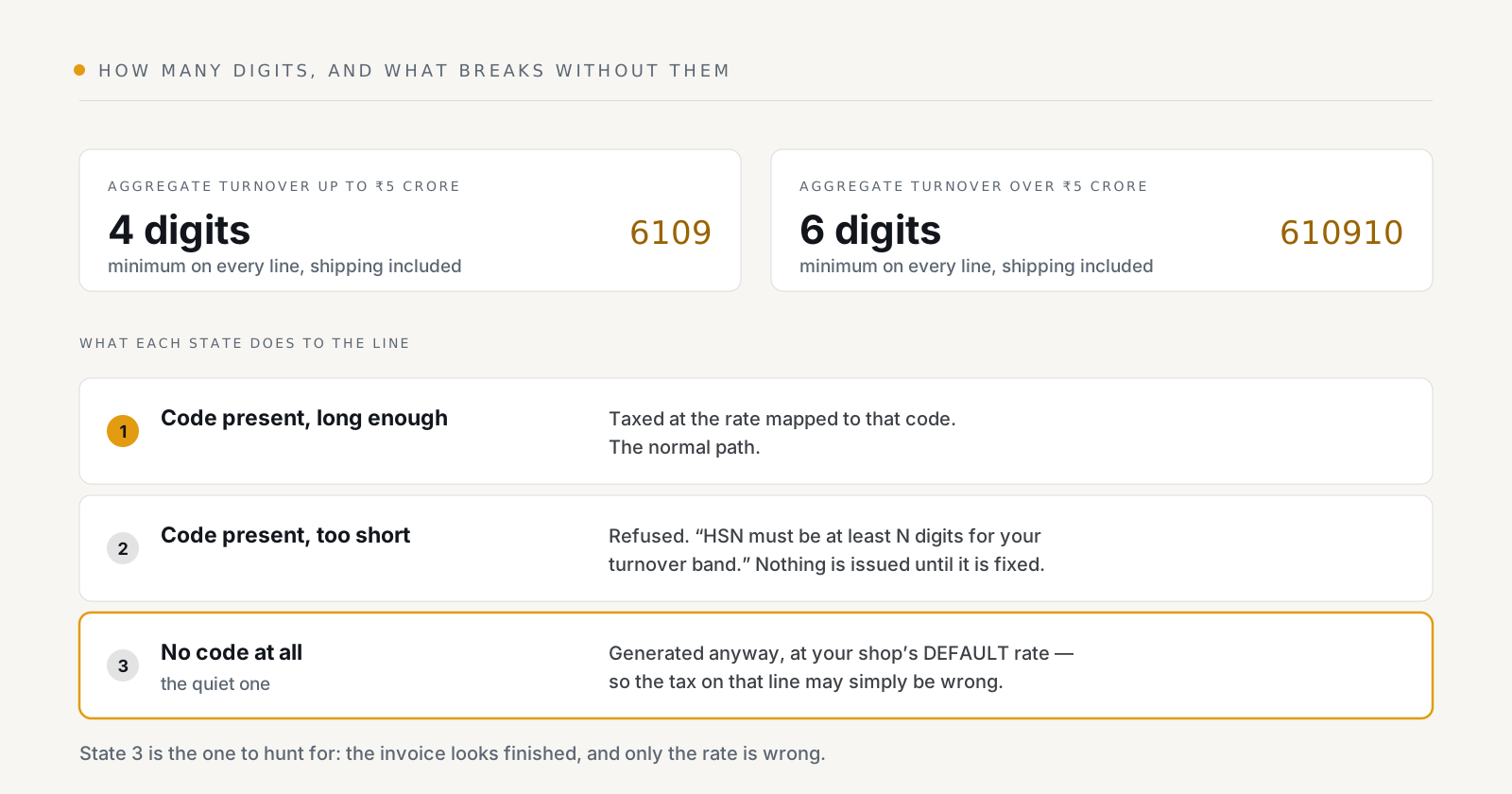
Notification 78/2020 ties the requirement to your aggregate turnover:
| Aggregate turnover | Minimum digits on a B2B or B2C invoice |
|---|---|
| Up to ₹5 crore | 4 |
| Over ₹5 crore | 6 |
Set the band once in Settings. BillNest validates every line against that minimum, so a 4-digit code that was fine last year starts being refused the year you cross the threshold — which is the behaviour you want, rather than discovering it in a return.
A code that is present but too short is a distinct failure from one that is missing, and worth treating as such: the product looks configured, so nobody goes looking.
HSN or SAC?
HSN classifies goods, SAC classifies services. They share the same column on the invoice and the same digit minimum. If you sell both — a product plus an installation fee, say — each line carries its own code, and the codes come from different schedules.
Shipping is a line too. If you charge for delivery, that charge needs its own HSN or SAC code and its own rate, and it has to meet the same digit minimum. It is the line most often forgotten, because it does not come from a product.
What happens when a code is missing
The line is taxed at your shop's default rate, and the invoice is generated. BillNest then counts how many invoices are in that state and says so:
N invoices may have the wrong GST rate — these invoices have line items with no HSN code, so the shop's default GST rate was applied and the tax may be incorrect.
The repair is two steps, in this order:
- Assign the codes on Products / HSN. A shop-specific code overrides the built-in one, so your own mapping always wins.
- Bulk & Jobs → Regenerate all over the affected range. This recomputes the documents against the corrected rates.
Regenerating is not editing. A document in a filed period, one carrying an IRN, and one with a credit or debit note against it are all locked, and regeneration skips them rather than silently rewriting a document your return has already reported. For those, the route is a credit note — see credit notes and debit notes.
This is also the argument for doing the mapping before you switch automatic generation on. Fixing eight products costs minutes; regenerating four hundred invoices costs a plan tier.
The built-in list, and its limits
BillNest seeds a searchable starter list of HSN and SAC codes covering the common e-commerce slabs. It is deliberately not the full 5,000-plus schedule — it exists so the lookup is useful on day one, not so you can stop thinking about classification.
Two consequences worth stating plainly:
- The seeded rates carry a date. They reflect the rate schedule as of the 56th GST Council meeting, which restructured the slabs. Rates change by notification, and when they do, the codes you rely on need re-checking against the CBIC schedule. An app cannot notice a notification for you.
- Value-based items are a trap. Several categories — apparel, footwear, made-ups — carry one rate below a value threshold and a higher one above it. The same HSN code is correct for both; the rate is not. If you sell either side of such a threshold, the per-product rate matters more than the code.
Classification is ultimately your call, and it is the part of GST most worth asking your accountant about once rather than guessing at repeatedly.
Where the rate actually comes from
Worth being precise, because it is a common misunderstanding: the rate belongs to the line, not to the invoice. An order with a 12% T-shirt, a nil-rated book and 18% headphones produces one invoice with three rates on it, and a summary that adds up whatever the lines produced. There is no "invoice rate" to get wrong.
Which is why a single missing code does not corrupt a whole document — it corrupts one line of it, quietly, while everything else stays right.
A five-minute audit
Worth running once, and again after any rate notification:
- Products / HSN — sort by products with no code. That list should be empty.
- Check your shipping line has a code and a rate.
- Confirm the turnover band matches reality. It is the one setting that silently changes what counts as valid.
- Open one invoice per rate you charge and check the rate on the line against your own schedule — not against what the app produced. The app is applying your mapping faithfully; the mapping is the thing that can be wrong.
- Check the HSN summary rows in GST Reports. It is the same data your return will carry, aggregated the way the portal wants it — see GSTR-1 and GSTR-3B.
BillNest is on the Shopify App Store. HSN mapping and the built-in code list are on every plan, including the free one.