Your Shopify orders already contain everything GSTR-1 needs. The work is sorting them into the right sections, netting off the credit notes, and getting the HSN summary to add up — which is mechanical, and therefore worth not doing by hand.
One thing to settle first: BillNest does not file anything. It does not connect to the GST portal. It builds the return data for a period and hands it to you in three formats. Filing stays with you or your accountant.
What comes out
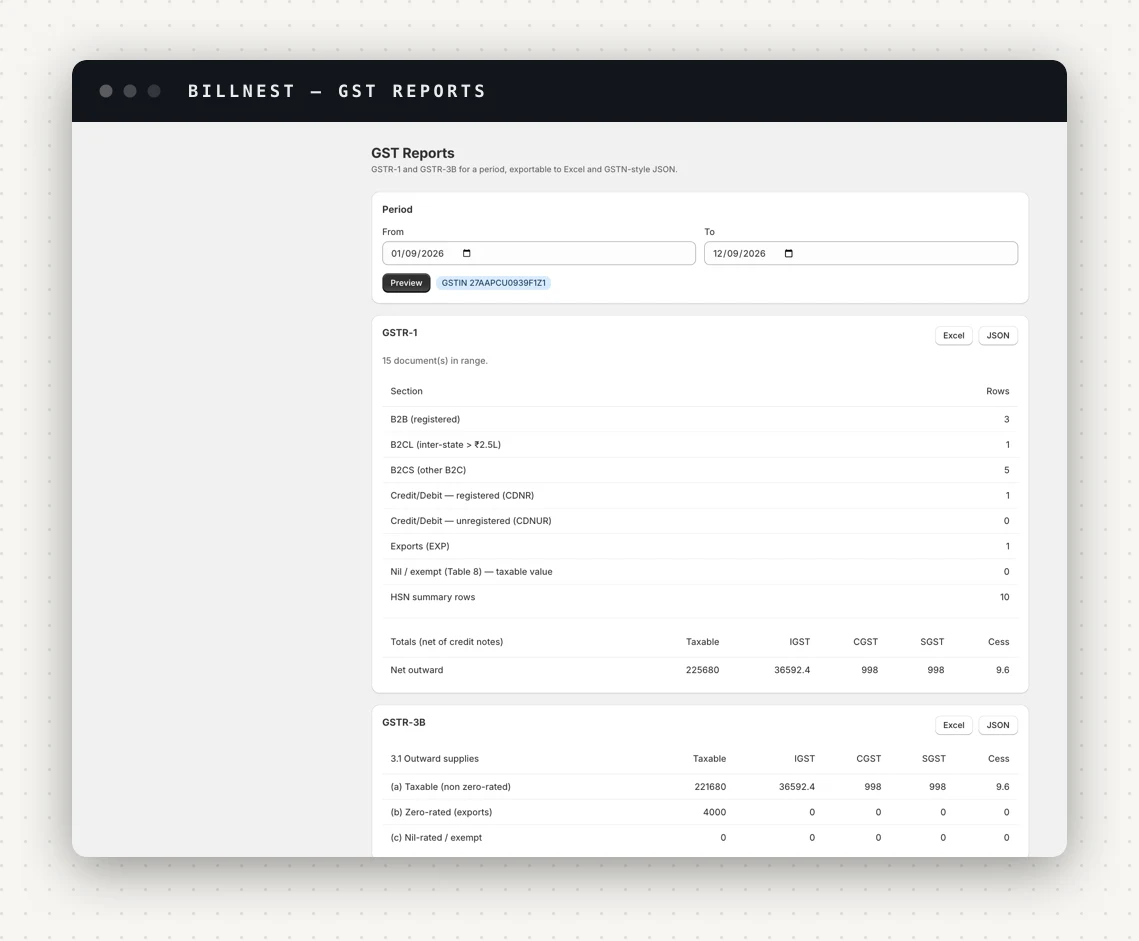
Three exports, for three different readers:
- Excel — one sheet per section, for you and your accountant to eyeball.
- GSTN-format JSON — shaped for the portal's offline utility.
- CSV invoice register — a flat spreadsheet of every invoice, credit note and debit note in the period with the order, customer, GSTIN, place of supply and tax breakup. This is the one an accountant actually asks for.
The GSTR-1 sections, and what lands where
| Section | What goes in it |
|---|---|
| B2B | Invoices to a buyer with a GSTIN, reported invoice-by-invoice |
| B2CL | Inter-state B2C invoices above the threshold, invoice-by-invoice |
| B2CS | All other B2C, summarised by rate and place of supply |
| CDNR | Credit and debit notes against registered buyers |
| CDNUR | Credit and debit notes against unregistered buyers |
| EXP | Exports, split by whether they went under LUT or on payment of IGST |
| Nil / exempt | Nil-rated, exempt and non-GST outward supplies |
| HSN summary | Quantity, taxable value and tax, grouped by HSN and rate |
| Documents issued | The serial ranges you used, cancelled ones included |
Whether an order is B2B or B2C is decided by one thing: whether a GSTIN was captured for that buyer. That is why checkout GSTIN capture is worth switching on — without it, every sale to a registered business lands in the B2C summary, and the buyer cannot claim the credit.
The B2CL threshold is a setting, not a constant
Inter-state B2C invoices above a notified value are reported individually rather than summarised. That threshold has moved: Notification 12/2024-CT reduced it from ₹2.5 lakh to ₹1 lakh, and ₹1 lakh is the default.
It stays editable per period on purpose. If you are filing an older period, the threshold that applied then is the one the return needs — so the section label in the app shows the value your store is set to rather than a hardcoded figure. When you file a back period, check the setting before you export.
Credit notes change the totals
The GSTR-1 totals and GSTR-3B table 3.1(a) are reported net of credit notes raised in the period. This is the mechanical reason a refund has to be a credit note rather than an edit: an edited invoice changes a document your last return already reported, whereas a credit note reduces the current period's outward supply, which is what the law expects.
Worth knowing when the numbers surprise you: a period with heavy returns will show outward supply well below the invoices issued, and that is correct.
What GSTR-3B carries
GSTR-3B is a summary, and BillNest fills the outward side:
- 3.1(a) — taxable outward supplies other than zero-rated, nil-rated and exempt, net of credit notes.
- 3.1(b) — zero-rated supplies, which is where exports and SEZ land.
- 3.1(c) — nil-rated and exempt. Worth noting that an exempt supply's value belongs here and not in 3.1(a); putting it in the wrong row is a common manual error.
- 3.2 — inter-state supplies to unregistered persons, broken out by place of supply.
The inward side — your purchases and input tax credit — is not something a Shopify app can know. Tables 4 and 5 stay with you.
Before you export
- Fix the HSN gaps first. The HSN summary is only as good as the mapping behind it, and a missing code has already been applied as your default rate. See HSN codes and GST rates.
- Narrow the range. Most filings are monthly, and a preview over a long range is refused rather than served slowly — the exports still cover whatever range you pick.
- Check the GSTIN selector if you file for more than one registration. Each GSTIN has its own series and its own return.
- Preview, then export. The preview shows row counts per section. A section you expected to be populated sitting at zero is the cheapest bug you will ever catch.
The filing lock
Once a period is filed, mark it so. Documents in a filed period become locked: they are skipped by bulk regeneration and they are never deleted, which keeps the app's copy matching the return you submitted.
Removing that lock makes every previously filed document editable again, so it asks you to type REOPEN to confirm. The warning is the point — changing a document you have already reported puts the app out of step with your filed return, and the fix for a filed mistake is a credit or debit note, not an edit.
BillNest is on the Shopify App Store. GSTR-1 and GSTR-3B exports are on the Growth plan and above.