Shopify will email your customer an order confirmation. It is not a tax invoice, and for an Indian store registered under GST that distinction matters: a tax invoice is a document with a prescribed list of particulars, a number that belongs to a gapless series, and a place in the return you file every month.
This guide covers what the law asks a tax invoice to carry, which of the six documents applies to a given situation, and the two numbering rules that cause the most trouble later.
What a tax invoice has to carry
Rule 46 of the CGST Rules sets the particulars. The ones that a Shopify order confirmation does not have are the ones that matter:
- Both parties, in full — your name, address and GSTIN, and the recipient's name and address. If the buyer is registered, their GSTIN too.
- An HSN or SAC code on every line. How many digits depends on your turnover — see HSN codes and GST rates.
- The taxable value of each line, after any discount.
- The rate and amount of each tax, separately. Not one "tax" total: CGST, SGST, IGST and cess each get their own line.
- Place of supply, and whether the supply is intra-state or inter-state. This is the field that decides the split — see place of supply.
- A serial number, unique for the financial year, and a date.
- Whether tax is payable on reverse charge.
- A signature or digital signature of the supplier or an authorised person.
Here is one, generated from a Shopify order with three line items at three different rates:
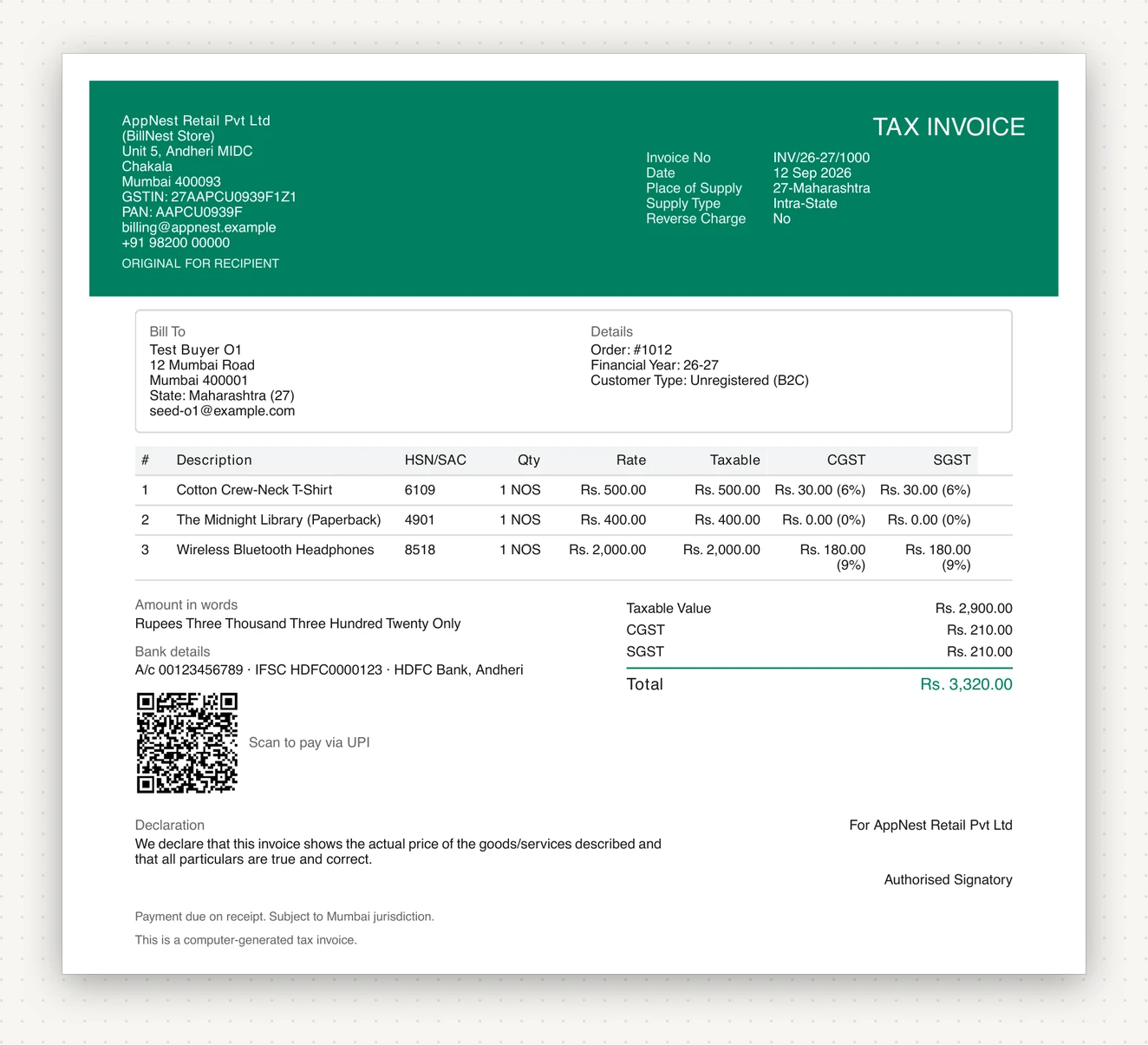
Three rates on one invoice is normal and is not a problem: the T-shirt is 12%, the paperback is nil-rated, the headphones are 18%. The rate belongs to the line, not to the invoice, and the summary adds up what the lines produced.
Six documents, and when each applies
"Invoice" is the default, not the only answer. Issuing the wrong document is a harder mistake to unwind than issuing none, because the number is already consumed.
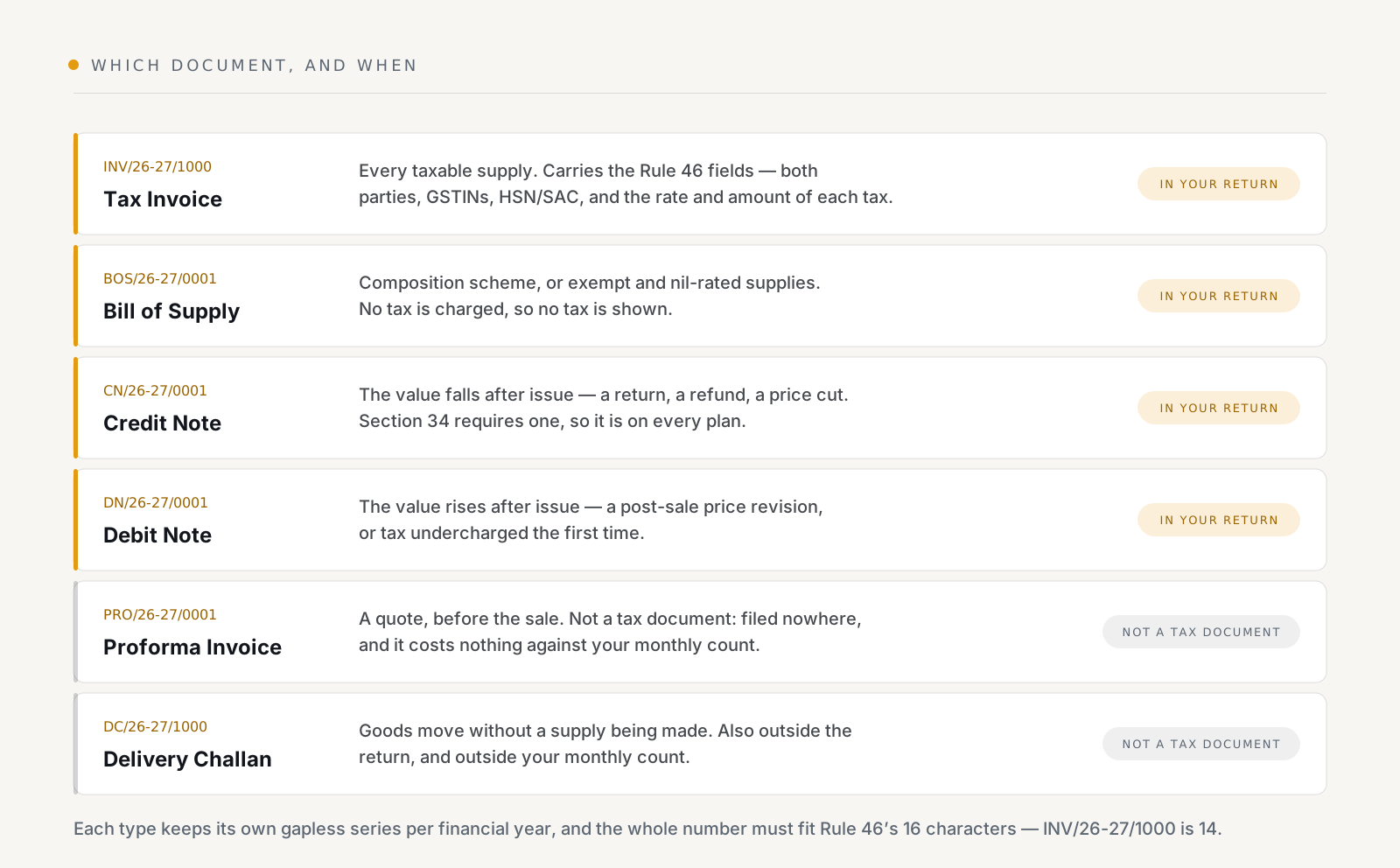
The distinction in the right-hand column is the useful one. A proforma invoice and a delivery challan are not tax documents — they never reach GSTR-1, and they do not count against a monthly invoice allowance. A tax invoice, a Bill of Supply, a credit note and a debit note all do.
A Bill of Supply replaces the tax invoice when there is no tax to show: you are registered under the composition scheme, or the supply is exempt or nil-rated. Charging tax on a Bill of Supply, or issuing a tax invoice when you are under composition, are both the same category of error.
Two numbering rules that bite later
Sixteen characters, total. Rule 46(b) caps the serial number at sixteen
characters including the prefix and every separator. INV/26-27/1000 is
fourteen, which leaves room for the series to reach five digits. A long vanity
prefix does not: once the running number needs a digit the prefix cannot pay
for, the format of your series changes mid-year, and a series that changes
shape mid-year is exactly what a scrutiny notice asks about. Pick a short
prefix, and change it at a financial-year boundary if you must change it.
Gapless, per financial year, per series. Each document type keeps its own sequence, and it restarts each financial year. BillNest allocates the number inside the same database transaction that writes the invoice, so a generation that fails does not burn a number — the transaction rolls back and the number is still there for the next document. That is also why an issued invoice is cancelled rather than deleted: deleting it would leave a hole. See credit notes and cancelled invoices.
If you sell under more than one GSTIN, each registration gets its own series, so two branches never share a sequence.
When the invoice has to exist
For a supply of goods, the invoice is due on or before removal or delivery. Generating on the paid order — which is what BillNest does, on the Shopify webhook — lands inside that window for an ordinary Shopify sale. For services, the window runs from the supply rather than the despatch.
The practical version: do not batch your invoicing to month-end. The document is meant to accompany the supply, and a month of retrospective invoices is both non-compliant and miserable to reconcile.
What this does not cover
Two things BillNest does not do, which you should know before you build a process around it:
- It does not file your returns. It produces GSTR-1 and GSTR-3B data as Excel and GSTN-format JSON, and a CSV register for your accountant. Filing happens on the GST portal. See GSTR-1 and GSTR-3B.
- It does not generate IRNs. If your aggregate turnover is over ₹5 crore, e-invoicing is mandatory and every B2B tax invoice, credit note and debit note must carry an IRN and signed QR code from the government portal. Until those documents are registered on the IRP — through the portal or your GSP — they are not valid tax invoices on their own. BillNest produces the Rule 46 document and the supporting paperwork; the IRN is a separate step.
Setting it up
Two fields decide whether anything can be generated at all: your GSTIN and your state. The state code is what the intra-state against inter-state comparison runs on, so BillNest refuses to produce a document without it rather than guessing and issuing a wrong one.
After that, assign HSN codes, generate a single invoice for an existing order, and read the PDF end to end before letting it run unattended — the seller block, the tax split, the series, and the rate on every line. It is ten minutes against a month of documents you would otherwise have to credit-note.
BillNest is on the Shopify App Store, with a free plan that covers 50 invoices a month and includes credit notes.