Every GST invoice you issue is either CGST plus SGST, or IGST. It is never both, and which one applies is decided by a single comparison: your state against the place of supply. Get it wrong and the tax total is still right, but it is sitting in the wrong heads — which is visible in your return, and useless to a B2B buyer trying to claim the credit.
The rule
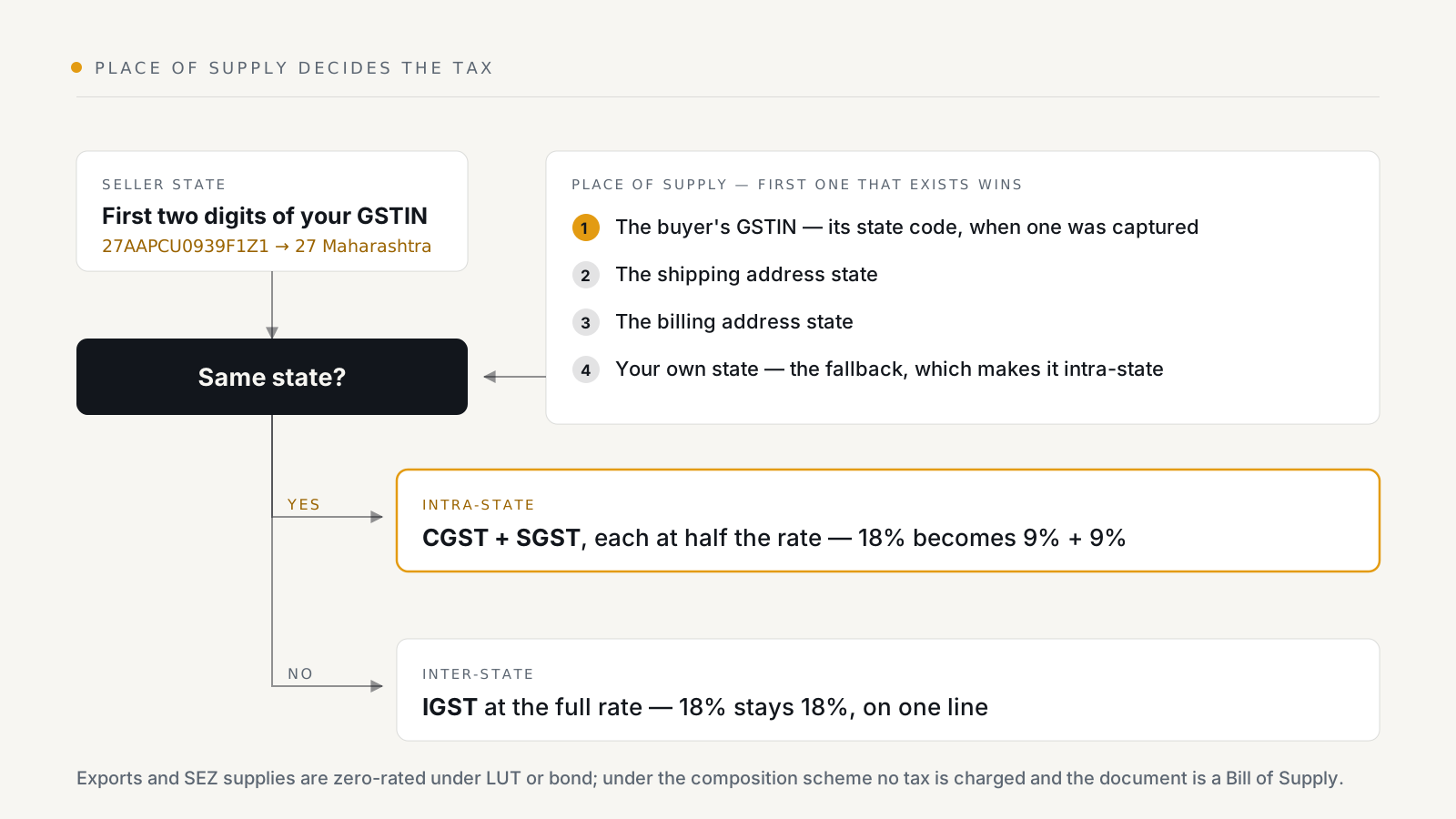
Your state is the first two digits of your own GSTIN. 27AAPCU0939F1Z1 is
Maharashtra. That is not configurable, and it should not be: the registration
is what fixes it.
Then:
- Same state → the supply is intra-state. The rate splits in half: an 18% item becomes 9% CGST plus 9% SGST.
- Different state → inter-state. The same 18% stays whole, on a single IGST line.
The merchant collects the same amount either way. What changes is which government it belongs to and, for a registered buyer, which credit pool they can use it from.
Which address decides it
This is where Shopify orders get interesting, because an order can carry three different states. BillNest takes the first of these that exists:
- The state code in the buyer's GSTIN, when one was captured at checkout.
- The shipping address state.
- The billing address state.
- Your own state, as a fallback — which makes the supply intra-state.
The order of the first two is the part worth understanding. If a registered buyer in Karnataka gives you their GSTIN but ships the goods to a warehouse in Maharashtra where you are also based, the supply is still inter-state and charged IGST. The GSTIN's state wins because the recipient of the supply is the registered entity, not the delivery dock. Charging CGST and SGST there would hand them a credit they cannot use.
The fallback at step 4 is a fallback, not a default — it only applies when an order has no buyer GSTIN, no shipping state and no billing state, which for a real Shopify order is rare.
What it looks like on the document
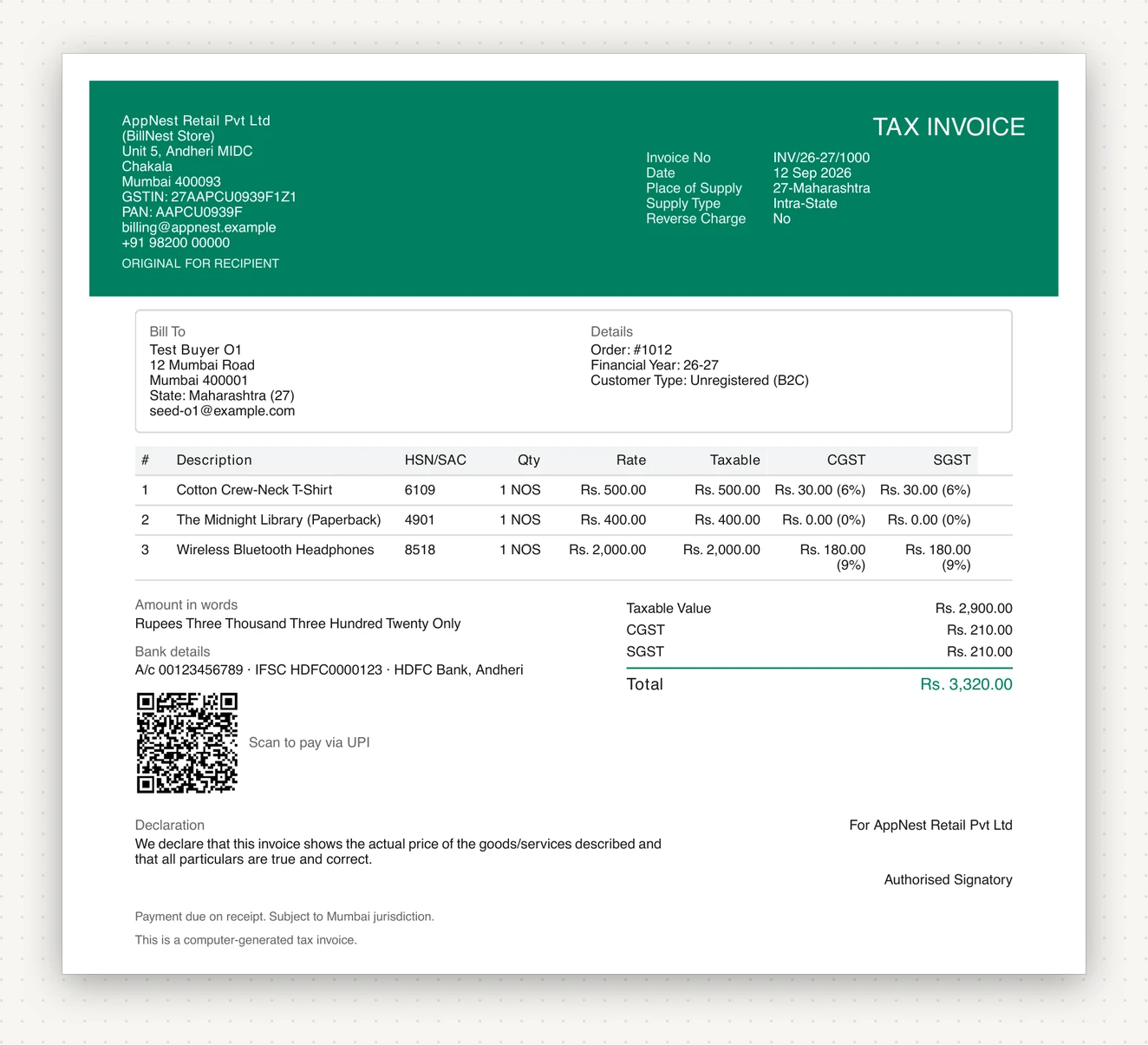
The same store, two orders. The first went to a buyer in its own state:
The second went to Tamil Nadu, and also carries compensation cess:
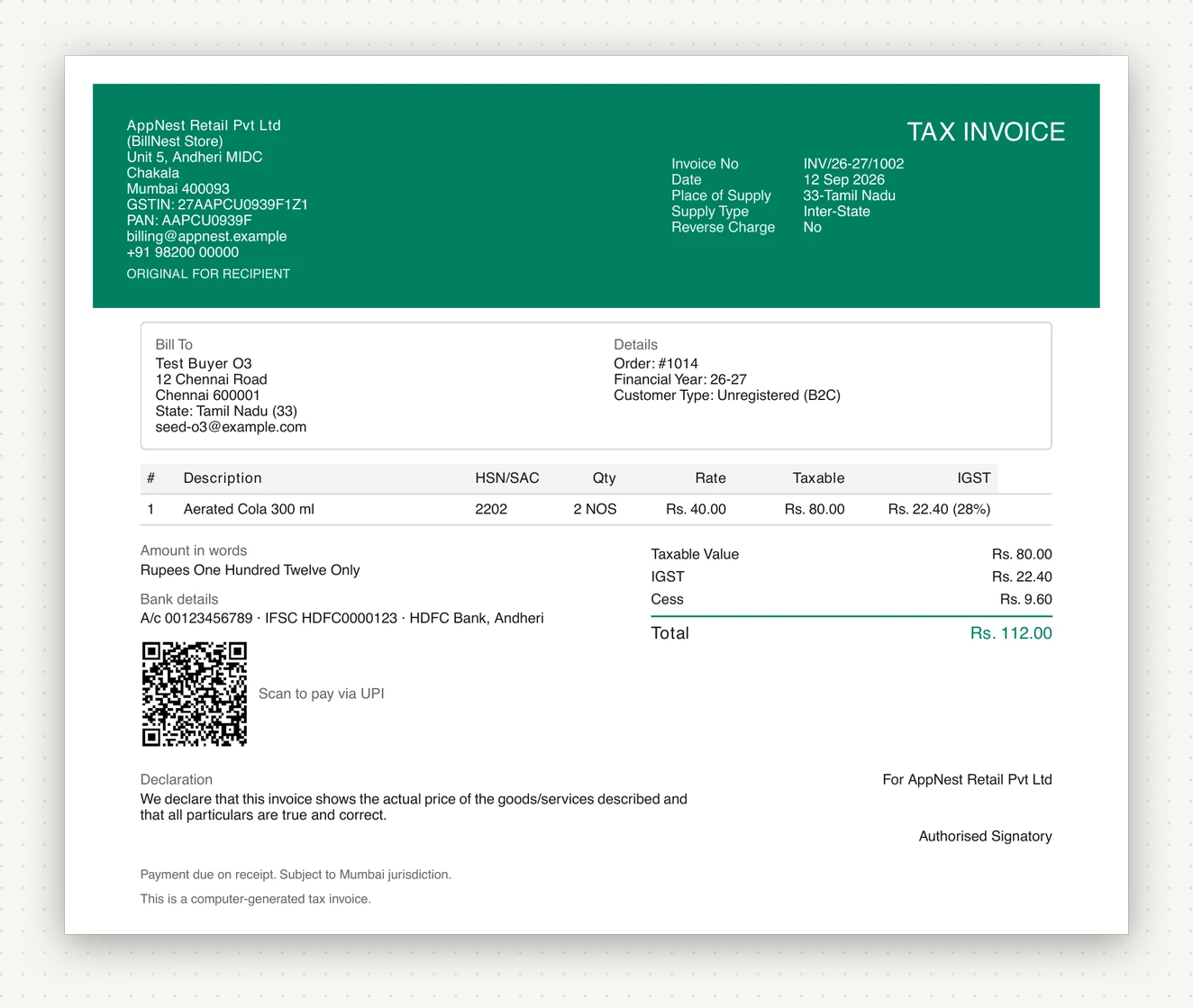
Two things to note on the second. IGST is one line at the full rate — there is no half-split to make. And cess is not GST: compensation cess applies to a specific list of goods on top of whatever GST rate they carry, and it appears as its own line in the summary and its own column in your return. Aerated drinks are the textbook case.
Exports, SEZ and the composition scheme
Three cases sit outside the intra-against-inter comparison:
- Exports and SEZ supplies are zero-rated. The place of supply is recorded
as
96 — Other Country, and under a LUT or bond no tax is levied at all. If you instead export on payment of IGST, full IGST is charged and reclaimed as a refund later; that is a choice you make once and configure, not per order. - Reverse charge supplies move the liability to the recipient. You do not collect the tax; the invoice says so on its face.
- The composition scheme charges no tax at all, and the document is a Bill of Supply rather than a tax invoice. See GST invoices on Shopify.
Getting it wrong, and fixing it
The two failures look different:
Wrong place of supply on an issued invoice. You cannot edit it — the number is in a gapless series and the period may already be filed. Raise a credit note against it and issue a fresh invoice with the right treatment. The credit note mirrors the original's place of supply deliberately, so the reversal lands in the same heads the charge did.
Missing permissions. If BillNest is missing a Shopify permission it was granted at install, it cannot see which location fulfilled an order, so orders fall back to your default GSTIN. On a multi-GSTIN store that means the wrong registration, the wrong split and the wrong number series — all at once, and all on documents you will file. The app raises this as a critical banner rather than carrying on quietly; re-approve when you see it.
Tax-inclusive pricing is not a failure, just a thing to know: whether a
line's price includes tax is read from the order's own taxes_included flag,
not from a shop setting that might have changed since. An invoice reflects how
the order was actually priced.
Checking your own setup
Generate one invoice for a local order and one for an order from another state, and read both. If the local one shows two tax lines at half the rate and the distant one shows a single IGST line at the full rate, the comparison is working — which is most of GST invoicing correct in one check.
BillNest is on the Shopify App Store. The free plan issues 50 invoices a month, which is more than enough to test both cases.