A bulk edit is something you do. A rule is something you stop doing, you describe the decision once and it happens without you.
The catch is that a rule which edits orders can, in principle, trigger itself on the edit it just made. Tag an order, the order updates, the update fires the rule, which tags the order. Most of the design of a safe automation is about that one problem.
The three parts
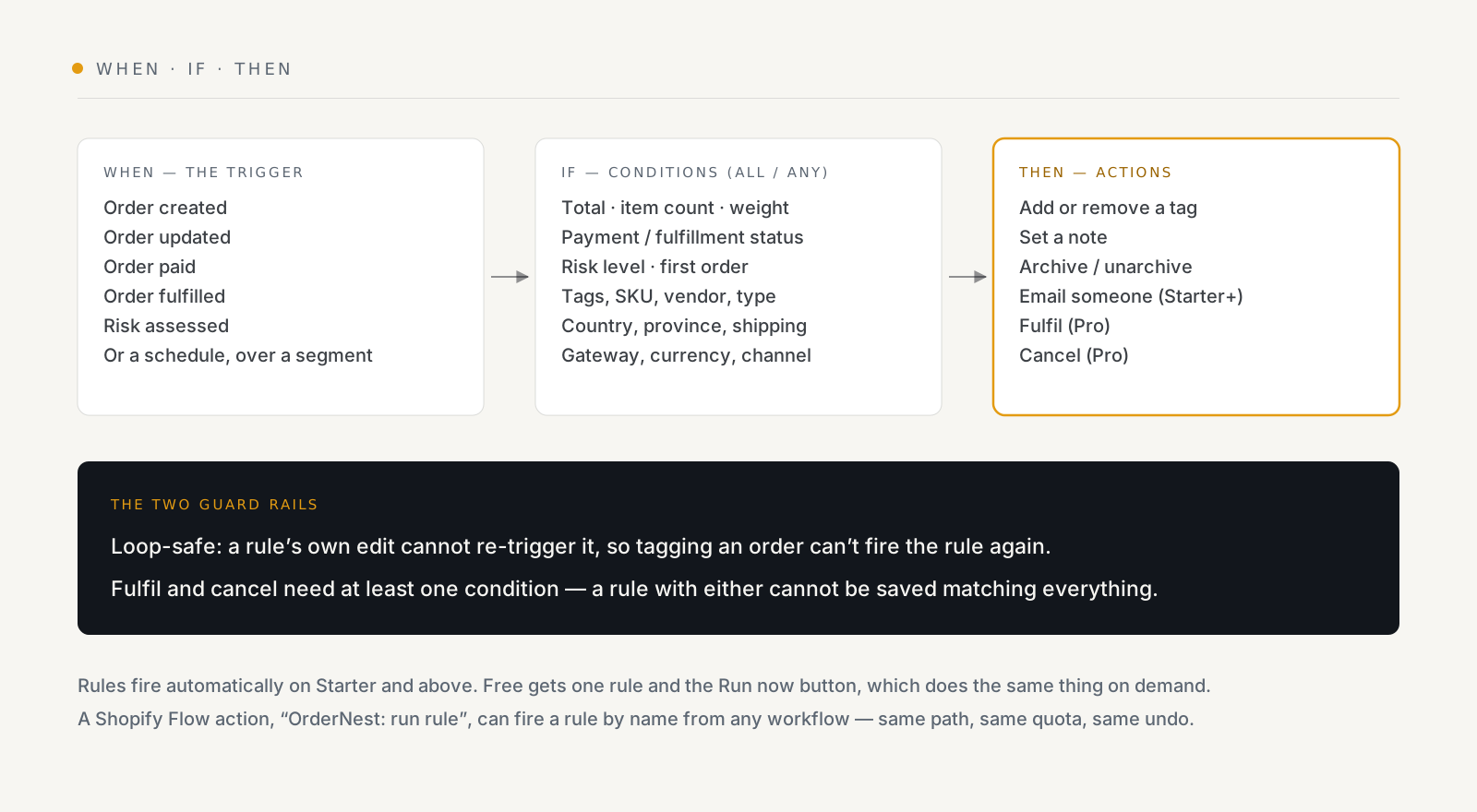
The trigger is an order event, created, updated, paid, fulfilled, or a risk assessment arriving, or a schedule. A scheduled rule runs hourly, daily or weekly over a saved segment, and fires once per order, so a daily sweep does not re-process the same backlog every morning.
The conditions combine with ALL or ANY, and there are a lot of them: order total, item count, weight, payment and fulfillment status, risk level, order and customer and product tags, whether it is the customer's first order, discount code, SKU, vendor, product type, country, province, shipping method, gateway, currency, channel, and whether the order requires shipping.
The actions are the same vocabulary as a bulk edit: tag, note, archive, unarchive, and, on the right plans, email someone, fulfil, or cancel.
The two guard rails
Rules are loop-safe. A rule's own edit cannot re-trigger it. You do not have to build a "has not already been tagged" condition to protect against the obvious recursion; that is handled.
Fulfil and cancel require at least one condition. A rule carrying either of those actions cannot be saved matching every order. That is a deliberate refusal rather than a warning, and it exists because those two actions are the ones with no undo.
Start with Run now, even when auto-firing is available
Every rule has a Run now button, and it is on every plan including Free.
Use it as the rehearsal. Build the rule, run it by hand, read the per-order results, then turn on automatic firing once you have seen it hit the right orders. A rule you have watched run once is a different proposition from a rule you have only read.
Automatic firing is on Starter and above. On Free you get one rule and the button, which is honestly the right way round for learning the tool.
What the plans actually gate
| Free | Starter | Pro | |
|---|---|---|---|
| Rules | 1 | 5 | Unlimited |
| Fires automatically | — | ✓ | ✓ |
| Email an action | — | 100/mo | 1,000/mo |
| Slack alerts | — | ✓ | ✓ |
| Fulfil / cancel actions | — | — | ✓ |
| Operations a month | 1,000 | 20,000 | Unlimited |
There are twelve templates to start from, and a visual builder. JSON stays available as the advanced path rather than the default, which is the right way round for a tool that edits live orders.
Running a rule from Shopify Flow
OrderNest ships a Flow action, "OrderNest: run rule", so any Flow workflow can fire a rule by name against an order. It needs no extra permissions, and the rule name is validated when you save the workflow rather than failing silently at 3am.
What matters is that it goes through the same path as a normal fire: dedupe per rule and order, counted against your quota, alerted on failure, and undoable. It is not a side door.
This is the answer when Flow can express the trigger you want but not the action, which is often.
Three rules worth stealing
- Flag high-risk before you ship. Trigger on risk assessed, condition risk
level is high, action add tag
review. Then work that tag by hand. - Chase the stuck queue. A scheduled daily rule over an "unfulfilled more than 5 days" segment, action email someone. Nobody has to remember to look.
- Mark first orders. Trigger on order paid, condition first order is true,
action add tag
first-order. Useful downstream for everything from packing notes to campaign segments.
What rules do not do
Worth stating plainly, because these are the adjacent things people assume: no order routing, no holds, no payment capture, no customer tagging, no packing slips. OrderNest edits orders: tags, notes, archive state, fulfilment and cancellation, and that is the whole surface.
See what OrderNest does, one rule and Run now on the free plan, automatic firing from Starter.